Cabarrus Amateur Radio Society

Cabarrus County, Concord, NC


16-Bit Applications on Modern Windows
Many amateur radio operators still have a collection of older software that refuses to die. Whether it's a favorite antenna modeling utility, a propagation calculator, a logging program from the DOS era, or Microsoft's classic QBasic, these programs often continue to do exactly what they were designed to do—even decades later.

Fortunately, modern computers have moved on.


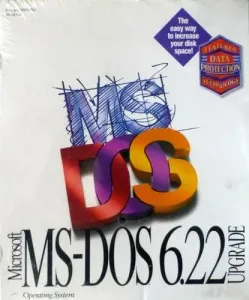
MS-DOS: The Operating System That Built the PC Revolution
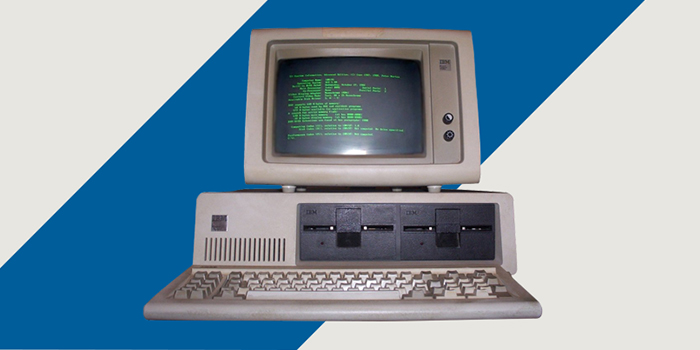
Long before Windows dominated the desktop, most IBM PCs and compatibles ran a text-based operating system called MS-DOS (Microsoft Disk/Dinosaur Operating System). Introduced in 1981, DOS provided a simple command-line interface that allowed users to run programs, manage files, and control hardware directly.


By modern standards DOS was remarkably small. The entire operating system could fit on a floppy disk and run comfortably in less memory than a modern web browser uses to display a single webpage. Yet it powered everything from business applications and games to scientific software, engineering tools, and early amateur radio programs.

One reason DOS remained popular for so long was its direct access to hardware. Programs could communicate with serial ports, printers, sound cards, and interface devices with very little overhead. Many early ham radio applications took advantage of this capability to control transceivers, TNCs, and packet radio systems.

Although DOS largely disappeared from everyday use by the late 1990s, its influence is still visible today. The Windows Command Prompt, batch files, drive letters such as C:, and many familiar command-line utilities can trace their roots directly back to DOS.


If you've tried running an old DOS or Windows 3.x application on a 64-bit version of Windows 10 or Windows 11, you've probably been greeted by an error message stating that the program cannot run on your PC. The reason is simple: Microsoft removed support for 16-bit applications from all 64-bit versions of Windows years ago.

For those who still rely on older software, that doesn't mean we're out of options.

The DOS History, Wars and Why MS-DOS Won
The story of DOS begins with CP/M, the dominant microcomputer operating system of the late 1970s. When IBM set out to develop the IBM PC, it initially looked to Digital Research, the creator of CP/M, for an operating system. For a variety of business and technical reasons, an agreement was never reached.

IBM then turned to Microsoft, which at the time was primarily known for its BASIC programming language. Microsoft licensed a CP/M-like operating system called QDOS ("Quick and Dirty Operating System"), written by Tim Paterson of Seattle Computer Products for Intel's 8086 and 8088 processors. Microsoft later purchased the rights, adapted it for IBM, and released it as PC DOS.


The crucial detail was that Microsoft retained the right to license the operating system to other computer manufacturers under the name MS-DOS. As IBM-compatible PCs flooded the market during the 1980s, MS-DOS became the standard operating system for personal computers. That licensing strategy transformed Microsoft from a small software company into an industry giant and helped shape the modern PC industry.

Microsoft paid $100,000 to acquire MS-DOS, then rode its coattails to become a billion-dollar company.

When most people think of DOS, they think of Microsoft's MS-DOS. But during the 1980s and early 1990s, several competing DOS operating systems fought for a place on the rapidly growing IBM PC platform.

In 1981 when IBM selected Microsoft's PC-DOS for its new IBM Personal Computer, PC-DOS and MS-DOS were essentially the same operating system, with IBM distributing PC-DOS for its own machines while Microsoft licensed MS-DOS to the growing army of PC-compatible manufacturers.

As the market expanded, competitors emerged. One of the most significant was DR-DOS, developed by Digital Research, the company founded by Gary Kildall. Ironically, Digital Research had previously created CP/M, the dominant microcomputer operating system before the IBM PC.

DR-DOS gained a loyal following because it often offered features before Microsoft did. Depending on the version, it included better memory management, more efficient use of conventional memory, superior disk utilities, task switching, and other advanced capabilities. Many power users considered it technically superior to contemporary versions of MS-DOS.

Other DOS variants also appeared over the years, including Novell DOS (which evolved from DR-DOS after Novell acquired Digital Research), IBM's PC-DOS, and later free alternatives such as FreeDOS.

So why did MS-DOS ultimately dominate?

Microsoft secured licensing agreements with nearly every major PC clone manufacturer, ensuring that MS-DOS shipped with millions of new computers. Software developers naturally targeted the operating system most customers already owned. This created a powerful cycle: more users attracted more software, and more software attracted more users. A lot like Windows nowadays...

Microsoft also benefited enormously from the success of Windows. As Windows evolved from a graphical shell running on top of DOS into the primary user interface for PCs, MS-DOS became the default foundation beneath it. Businesses and consumers preferred the compatibility and simplicity of using the operating system already included with their computers.

By the mid-1990s, the battle was effectively over. DR-DOS remained respected among enthusiasts, but MS-DOS had become the industry standard. Yet history reminds us that the best technology does not always win. Sometimes the victor is the one that ships on the most machines.

Cut and Paste: A Revolutionary Idea
Today, copying and pasting text is so commonplace that we rarely think about it, but the concept was revolutionary when it was introduced. The terms "cut" and "paste" come from the publishing world, where editors literally cut sections of text from printed pages and pasted them into new layouts.

The computer version was pioneered in the 1970s at the Xerox PARC research laboratory. Early graphical computer systems allowed users to select text, remove it, and insert it elsewhere electronically. The idea was later popularized by the Apple Lisa and Macintosh computers, and eventually became a standard feature of Microsoft Windows and every modern operating system.

What once required retyping entire paragraphs can now be done with a few keystrokes. It is difficult to imagine modern computing without cut, copy, and paste—one of the simplest yet most important productivity innovations ever developed.


Why 16-Bit Programs No Longer Work
The original IBM PC and compatible systems used 16-bit processors such as the Intel 8088, 80286, and later the 80386. Software written for these machines expected a completely different operating environment than what exists today.

Windows 95, 98, XP, and even 32-bit versions of Windows 7 included a subsystem known as NTVDM (NT Virtual DOS Machine), which allowed older DOS and 16-bit Windows applications to continue running.

When Microsoft transitioned to 64-bit operating systems, NTVDM was left behind. As a result, Windows 10 and Windows 11 cannot directly execute 16-bit code.

That affects more than just old games. Many technical and engineering programs, including some amateur radio applications, were written during the DOS era and remain useful today.

Option 1: DOSBox – The Universal Solution
For most users,
DOSBox is the easiest way to bring old software back to life.


DOSBox is a free x86 emulator originally created for running classic DOS games, but it works equally well for radio and technical software. It emulates an entire DOS computer, complete with processor, memory, display, keyboard, and sound hardware.

After installing DOSBox, you simply "mount" a directory on your hard drive as a virtual DOS drive and launch your program from within the emulator. For example:

mount c c:\dosapps
c:
someprogram.exe


Once configured, many old applications run exactly as they did on a 1990s computer. For ham radio operators, DOSBox can often revive:

  • Legacy logging software (so you can recover old contest logs)
  • Antenna and RF utilities
  • Simple CAD tools
  • Early packet radio tools
  • QBasic and QuickBasic development environments

Because DOSBox emulates the entire environment, compatibility is often surprisingly good.

Option 2: DOSBox-X and Other Enhanced Versions
Several enhanced DOSBox variants are available, with
DOSBox-X being one of the most popular.
These versions add features such as:

  • Better hardware emulation
  • Windows 3.x support
  • More flexible memory management
  • Improved file sharing with the host operating system
  • Enhanced printing support

If your software requires Windows 3.1 or has unusual hardware requirements, one of these enhanced versions may be worth investigating.

Option 3: Virtual Machines
Some programs need more than DOS emulation. Certain applications from the Windows 95, Windows 98, or Windows XP era may require a complete operating system. In these cases, a virtual machine can be the answer.
Software such as:


allows you to create a virtual computer inside your modern PC.

A virtual machine (VM) is exactly what it sounds like: a software-created computer running inside your real computer. Using programs such as the ones above, you can create an entirely separate operating system that behaves as if it were running on its own dedicated hardware.

One of the biggest advantages of a virtual machine is isolation. When testing new software, experimenting with unfamiliar programs, or evaluating utilities downloaded from the Internet, you can install them inside the VM rather than on your primary Windows system. Any files, registry changes, settings modifications, or software conflicts remain contained within the virtual machine. If something goes wrong, the VM can often be restored to a previous snapshot in just a few minutes.

Virtual machines have many other practical uses. They can be used to test operating system upgrades before deploying them on a primary computer, learn Linux without repartitioning a hard drive, experiment with networking and server software, create dedicated environments for software development, or safely investigate suspicious files. Many IT professionals use VMs daily because they can create, clone, back up, and restore complete computer systems with remarkable ease.

Perhaps the greatest benefit is peace of mind. A virtual machine gives you a sandbox where you can experiment freely, knowing that your primary operating system, installed applications, and carefully configured settings remain untouched.


You can install an older operating system and run legacy software in its native environment while keeping it isolated from your main system.

For operators who have a large library of older radio software, maintaining a Windows XP virtual machine can be an excellent long-term solution.

QBasic: The Language That Invited You to Experiment
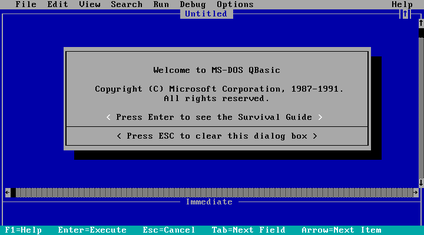
One of the most common questions concerns QBasic, Microsoft's popular BASIC programming environment that shipped with MS-DOS.


For an entire generation of computer enthusiasts, QBasic was their first introduction to programming. Included with MS-DOS beginning in the early 1990s, it transformed a computer from something you merely used into something you could create with.

QBasic featured a friendly full-screen editor, built-in help system, and an interpreter that allowed programs to be run instantly. There were no projects to configure, no libraries to install, and no complicated development environment to learn. You simply started QBasic and began typing.

Many future engineers, programmers, scientists, and radio amateurs wrote their first software in QBasic. Frequency conversion calculators, resistor-network solvers, antenna formulas, propagation predictors, contest utilities, and station logging programs were common beginner projects.

One of QBasic's greatest strengths was that it encouraged experimentation. A user could type a few lines of code, press a key, and immediately see the results. That instant feedback made learning both rewarding and addictive.

Of course, modern development environments have evolved dramatically since the days of QBasic. Tools such as Microsoft Visual Studio provide professional-grade capabilities including graphical debugging, source control integration, code analysis, unit testing, database connectivity, and support for multiple programming languages. Other modern tools, from Eclipse and Code::Blocks to Visual Studio Code, offer similar advantages. These environments make it possible to develop software of almost unlimited size and complexity.

The tradeoff is that they can be intimidating to newcomers. A simple "Hello, World" program that took only a few keystrokes in QBasic may require selecting project types, configuring build settings, and navigating dozens of menus and options. For many hobbyists and experimenters, especially those writing small utility programs, QBasic's greatest strength was its simplicity: you could start the program, type a few lines of code, and be running your creation in minutes. Modern tools are unquestionably more powerful, but they often come with a much steeper learning curve.

Many hams learned programming through QBasic. It was simple, approachable, and ideal for writing utility programs, propagation calculators, frequency conversion tools, and countless station accessories. Even today, decades after its introduction, many programmers remember QBasic with affection. Not because it was the most powerful language ever created, but because it made programming accessible to ordinary people and inspired countless technical careers. For many of us, it was the gateway that led from curiosity to engineering.

Fortunately, there are several excellent ways to continue using it today.

QB64
For most users,
QB64 is the best choice.


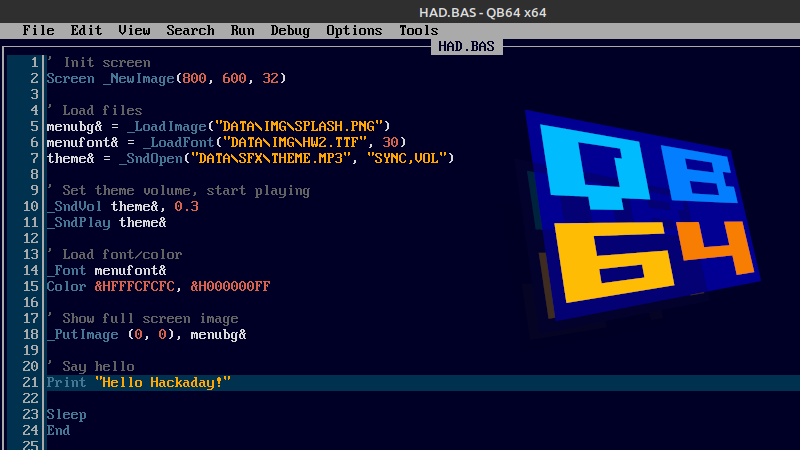
QB64 recreates the classic QBasic development environment almost perfectly. The familiar blue editor appears exactly as many of us remember it, and most existing .BAS programs run with little or no modification.

Behind the scenes, QB64 converts your BASIC code into modern C++ and compiles it into a native Windows executable. The result is software that runs at full speed on current hardware.

QB64 also removes many of the limitations that frustrated programmers in the DOS era. Memory restrictions disappear, and support for modern graphics, sound, networking, and file handling is available.

QB64 includes compatibility versions of many classic QBasic commands, including PEEK and POKE. However, because modern operating systems protect memory, they do not behave exactly as they did under DOS.

For example, this old DOS-style code works:
a = PEEK(1000)
POKE 1000, 255


But you generally cannot use QB64 to poke arbitrary hardware addresses, video memory, BIOS memory, or I/O ports (like printer port pins) the way DOS programmers once did. Windows prevents applications from directly accessing hardware and protected memory.

QB64 does provide alternative mechanisms for graphics, sound, files, networking, and serial communications that eliminate the need for most traditional PEEK/POKE tricks.

If you simply want the classic QBasic experience without dealing with emulators, QB64 is hard to beat.

FreeBASIC
FreeBASIC takes a slightly different approach. Rather than focusing exclusively on compatibility, it provides a powerful modern compiler while retaining support for traditional Microsoft BASIC syntax.

Using its compatibility mode, many older QBasic programs can be compiled with minimal changes. At the same time, programmers gain access to modern language features and development techniques.

FreeBASIC also supports PEEK and POKE in several forms:
POKE address, value
x = PEEK(address)

and also typed versions:
POKE Integer, address, 1234
x = PEEK(UInteger, address)


Since FreeBASIC compiles native machine code, these operations actually access memory locations within the process space.

However, under Windows you're still limited by the operating system's memory protection. You cannot simply POKE video memory at &HB8000 or access hardware ports directly as you could under DOS - so no toggling PRN port pins..

For users interested in maintaining or expanding older code, FreeBASIC offers a good balance between nostalgia and capability.

Original QBasic Under DOSBox
Some people want the genuine article.

If that's you, DOSBox allows the original Microsoft QBASIC.EXE or QB.EXE programs to run exactly as they did decades ago.

The original editor, help system, keyboard shortcuts, and even the familiar PC speaker sounds remain intact.
For educational purposes, historical interest, or simple nostalgia, nothing beats running the real thing.

QBasic running inside DOSBox is one of the few ways to get "real" DOS-style PEEK and POKE behavior on a modern Windows PC.

For ordinary memory access, PEEK and POKE work essentially the same way they did on an actual DOS machine:
POKE 1000, 123
PRINT PEEK(1000)


You can also access classic DOS memory areas such as screen memory:
DEF SEG = &HB800
POKE 0, ASC("H")
POKE 1, 15


which writes directly to the text-mode display, just like on a real VGA adapter.

However, there are a few limitations because DOSBox is an emulator:

Things that usually work:
  • Conventional DOS memory access
  • Screen memory manipulation
  • BIOS data area access
  • Interrupt calls
  • Most classic QBasic tricks from books and magazines
  • Old DOS games and utilities
  • Things that may not work exactly
  • Direct access to modern PC hardware
  • Some timing-sensitive code
  • Programs expecting a specific ISA card
  • Direct control of modern serial and parallel hardware

For example, many old ham programs used:
OUT &H3F8, value to talk directly to COM1. DOSBox may emulate the port, but you must configure DOSBox to map that virtual COM port to a real serial port or a virtual one. Not every hardware-access technique works transparently.

For nostalgia and compatibility, though, DOSBox + the original QBASIC.EXE is about as close as you'll get to sitting in front of a 386 running DOS 6.22, and it's generally the best choice if you want old PEEK and POKE programs to behave exactly as their authors intended.

What About Old Ham Radio Programs?
Many amateur radio applications from the 1980s and early 1990s were written in Turbo Pascal, QuickBasic, C, or assembly language and distributed as DOS executables.

Before giving up on an older program, try it in DOSBox. You may be surprised how well it works.

Programs that primarily use the keyboard, screen, and file system generally have an excellent chance of running successfully.

Software that requires direct access to serial ports, specialized interface hardware, or timing-critical operations can be more challenging, but even those cases often have solutions through USB-to-serial adapters, virtual serial ports, or virtual machines.

The reality is that many older ham radio applications remain useful because radio physics hasn't changed. A propagation calculator written in 1992 may still produce perfectly valid results today.

Keeping Legacy Software Alive
One of the strengths of amateur radio has always been preserving and sharing technical knowledge. The same philosophy applies to software.

While modern computers no longer support 16-bit applications directly, tools such as DOSBox, virtual machines, QB64, and FreeBASIC make it possible to continue using programs that might otherwise be lost.

Whether you're revisiting QBasic, recovering an old station utility, or simply exploring the software that helped define an earlier era of computing, today's systems are more than capable of keeping those classic applications alive.

Sometimes the newest technology is at its best when it helps us preserve the old.

Mouse: The XY Position Indicator that Changed Everything
Before the desktop mouse became an extension of the human hand, computing was strictly a keyboard-driven affair of commands, syntaxes, and punch cards. The transition to visual point-and-click navigation took over two decades of engineering refinement.
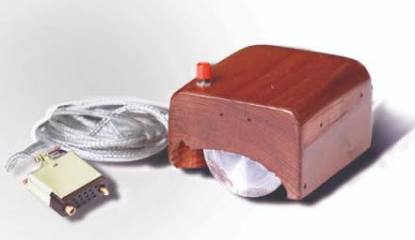


The 1964 Wooden Mouse Prototype - Source: History of Information

1964: The Wooden BoxThe story begins at the Stanford Research Institute, where Douglas Engelbart designed the first prototype. Carved out of a simple block of wood, it housed two perpendicular metallic wheels that tracked X and Y coordinate axes on a surface. It featured a single red button on top, with a thick cord trailing out the back—instantly earning it the nickname "the mouse" from the research team.

1968: The Mother of All DemosEngelbart publicly debuted the device on December 9, 1968, during an event now famously known as "The Mother of All Demos." He sat on stage wearing a headset, manipulating text, graphics, and hyperlinks on a screen in real time using his wooden box. The official patent, granted in 1970, dryly labeled it an "X-Y Position Indicator for a Display System."

1973: The Ball and the Xerox AltoThe hardware took a massive leap forward at Xerox PARC (Palo Alto Research Center). Engineer Bill English replaced the restrictive internal wheels with a spherical ball bearing that could roll smoothly in any direction. This trackball-driven mouse became a core component of the Xerox Alto, the world's first true Graphical User Interface (GUI) workstation.

1984: The $15 Commercial Breakthrough - While Xerox pioneered the technology, their commercial systems cost upwards of $16,000, making them inaccessible to the public. Steve Jobs famously toured Xerox PARC in 1979, saw the GUI and the mouse, and immediately licensed the concept for Apple. Jobs tasked industrial design firm Hovey-Kelley to redesign the Xerox mouse—which cost $300 to manufacture and frequently jammed—into a streamlined, single-button device that could be mass-produced for just $15. It shipped standard with the 1984 Macintosh, permanently cementing the mouse into mainstream consumer culture.

Why the Tail Moved: Early prototypes had the cable exiting from the bottom of the mouse, near the wrist. Designers quickly realized the wire constantly tangled under the user's hand, so they moved the exit point to the front "nose" of the device.


This article is reprinted with permission of the author, Christopher Krstanovic - AI2F.
About Author
Christopher Krstanovic, AI2F, is a lifelong amateur radio operator, first licensed in the US in 1980s as WR1F. He holds degrees in Physics and a PhD in Electrical Engineering, and his career has spanned corporate engineering as well as technology entrepreneurship. After leaving corporate America, he founded and led three companies before returning to active amateur radio under his current call sign. His operating interests include HF, antenna design, practical radio engineering, Astronomy.


Copyright 2026 © Cabarrus Amateur Radio Society. All Rights Reserved.