FT8 DXing
FT8 has changed the landscape of HF DXing, and not everyone is comfortable with that—often for good reasons. This article isn’t meant to defend the mode, evangelize it, or teach basic setup. It’s written for operators who already use FT8 (and FT4) and want to use it well: efficiently, ethically, and with an understanding of what actually makes the difference on the bands.
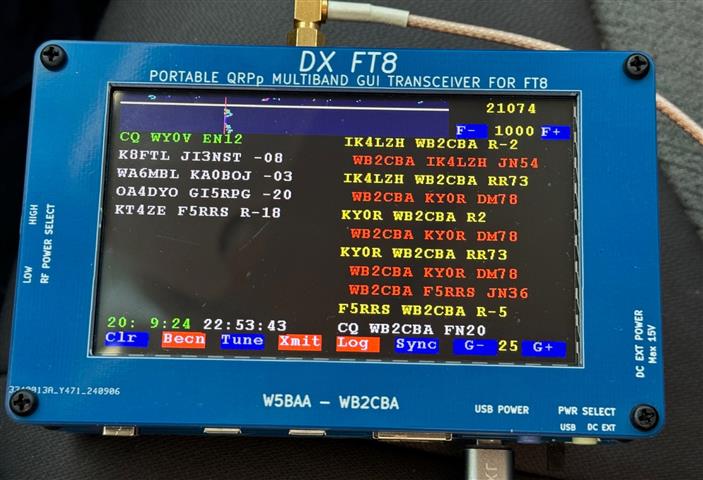
FT8—and most digital modes, really—is built for DX. There’s no room for long conversations or casual back and forth; everything is distilled down to the essential exchange needed to log the contact. It’s easy to see why some long time operators view FT8 as a modern intrusion they love to dislike.
It’s undeniably quicker than SSB or CW, appears to demand less operator finesse than CW, and works well with equipment far more modest than what’s typically required for reliable SSB DXing.
Reaching VK, ZL, or BY from the land of Ks and Ws on a regular basis without an amplifier and a solid beam is not a reality—yet on FT8, those same contacts can become routine if you understand the mode. Its narrow bandwidth (50Hz) also enables communication at remarkably low signal to noise ratios. As an experiment, I managed to earn enough contacts for 10 meter DXCC in a single month using just 25 watts and a simple 40 meter EFHW.
Does that mean FT8 makes DXing effortless? Not quite. While Europe and South America are usually straightforward, the challenge ramps up when you start chasing Africa, Asia, and especially the far reaches of Indochina and Oceania.
I’m not going to walk through FT8 station setup!—there’s already a mountain of guides and countless YouTube tutorials covering that. Neither will I preach how important it is to sync your PC to the network or GPS time.
What’s surprisingly scarce, though, is practical, targeted advice on how to excel at FT8 (or FT4). The mode behaves very differently from SSB or CW, and succeeding with it requires a different mindset and approach.
I should mention that I’m not a QRP operator—25 watts is about as low as I go, and I do not shy away from high power when needed. Even so, almost all the principles and techniques outlined below apply broadly, no matter what power level you prefer to run.
What FT4 Is (and When It Makes Sense)
FT4 is a faster, less sensitive cousin of FT8, designed for situations where propagation is good and operator throughput matters more than absolute weak-signal performance. It uses the same basic principles—structured messages, narrow bandwidth, and machine decoding—but runs on 7.5-second transmit/receive cycles, cutting QSO time roughly in half. The price you pay for that speed is sensitivity: FT4 typically requires 4–6 dB stronger signals than FT8 to decode reliably.
In practice, FT4 shines during contests, strong openings, and high-band activity where signals are plentiful and stable. It allows DX stations to work far more callers in a given time and rewards operators who can recognize good conditions and move quickly.
When bands are marginal or paths are near the noise floor, FT8 remains the better choice. Think of FT4 as the mode you use when the band is alive, and FT8 as the one you lean on when it’s merely breathing.
Software
To get started, you’ll obviously need FT8 software. WSJT-X remains the standard choice, though several variants exist, including WSJT-X_Improved. I personally prefer WSJT-Z because it can automatically continue calling CQ while filtering incoming replies. Some operators dislike this approach, but it frees me to focus on evaluating band conditions and choosing which stations are worth chasing.
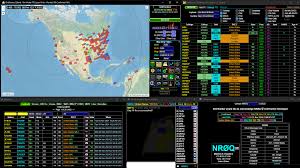
Adding GridTracker to your setup is a tremendous upgrade. It integrates seamlessly with any WSJT version and provides a clear, real time view of band activity. You can sort stations however you like—I sort by descending SNR—and instantly see LoTW, eQSL, and QRZ status, grid information, and more. If you’re working toward DXCC and a station doesn’t use LoTW, you can quickly decide whether the contact is worth pursuing. Connecting to PSKReporter is essential as well, since it shows global reports of who is hearing your signal, at what SNR, and whether your power level is sufficient. In other words, this is your personal propagation sniffer.
A good logging program is equally important. It saves enormous amounts of time and manages LoTW and other QSL services automatically. There are many solid options, and most perform well. My personal free favorite is the DX Lab Suite, though that’s simply a matter of preference.
Antennas: What to Expect
FT8’s weak-signal capabilities don’t make antennas irrelevant—they just change the game. Your choice of antenna still strongly affects both transmit efficiency and receive clarity, especially in noisy or crowded environments.
Dipoles are reliable and predictable. They deliver consistent performance, are easy to deploy, and often provide a reasonable compromise between transmit and receive. At moderate height, a simple wire dipole can give surprising results on FT8, particularly when combined with low noise surroundings.
Verticals offer omnidirectional coverage, which can be an advantage on lower bands or when propagation is unpredictable. They often pick up more local noise, however, and may struggle in DX-heavy directions if the noise floor is high. Ground system quality is critical for verticals to perform optimally.
Beams remain the gold standard for DX. High-gain directional antennas improve both transmit and receive, rejecting unwanted QRM and QRN from off-axis directions. Even modest gain can make a large difference when chasing weak signals or distant rare entities, allowing FT8 to work at lower power while still reliably reaching far-off stations.
In short: FT8 lets weaker antennas work, but the better your antenna, the easier it is to get those rare or difficult contacts. Good gain and low-noise environments always outperform brute force power.
Signal to Noise Ratio and Power
In digital modes, we work with SNR rather than traditional signal strength reports. It’s easy to assume that two stations running the same power should produce identical SNR readings thanks to reciprocity, but real world noise levels make that unlikely. One operator might be in a quiet rural location, while another is buried in industrial size QRM.
Although antenna systems follow the reciprocity rule for signal strength, SNR is a different story. A beam can reject much of the QRM and QRN arriving from the rear and sides, while a vertical offers no such protection. The result is often a noticeably cleaner receive environment for the beam, even if both antennas deliver similar transmitted signal levels. If you can't hear them - you can't work them.
A station’s reported SNR is therefore only a starting point—useful for judging how much power you might need to reach them and how well you may do.
On FT8, I typically run my 100 watt rig at around 25–30 watts, which is enough for the vast majority of contacts. Bumping the power to 50 watts gives roughly a 3dB improvement, and going to the full 100 watts adds about 6dB. Sometimes that extra punch is justified, especially when the station on the other end is one you really want in the log, just remember you can do this only briefly, into low SWR antenna, or you will blow your finals.
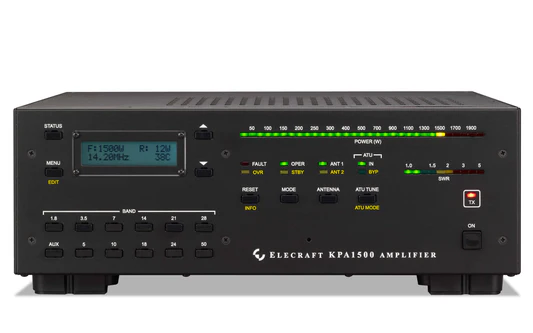
There are also situations—more common than many expect—where additional help is needed. My 1500 watt amplifier, for example, will run FT8 comfortably at 500 watts indefinitely, providing about a 13 dB boost over a 25W power. A signal that might normally land at –25dB (basically un-decodable) would rise to –12dB, making it an easy decode.
Some operators push back on this technique, insisting that FT8 is meant to be a low power mode. That’s a misunderstanding. FT8 is a weak signal mode, not a low power one. As long as you stay within the limits of your license, using more power when conditions call for it is entirely legitimate.
There’s no authoritative global statistic on how many FT8 operators run “high power,” but if you look across user surveys, forum discussions, cluster reports, and the collective experience of operators worldwide, you can form a fairly realistic sense of how common it actually is:
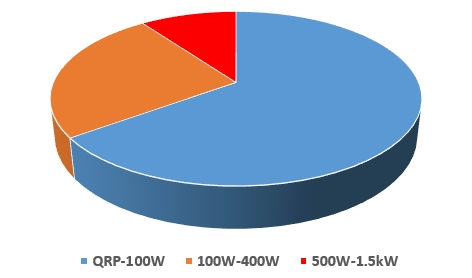
The point is to give you the tools to succeed, not to suggest running high power all the time. It is a tool to be used sparingly. And whatever power level you choose, always make sure your ALC isn’t being overdriven, or you’ll end up monopolizing the band in all the wrong ways.
Excessive ALC or audio drive doesn’t just stress your rig — it widens your signal and raises the noise floor for everyone else. IMD splatter, is a real sin on FT8! FT8 rewards clean signals and good antennas, not knob-twisting. Run it like CW discipline, not SSB bravado, and you’ll stay on the right side of both the rules and your fellow ops.
Listening Rule
Listening is arguably the single most important skill in FT8—far more so than in SSB or CW. Even when you’re eager to jump on that rare DX you’ve been chasing, it pays to pause for a moment. A quick refresher helps frame why:
• On FT8, your transmit frequency is almost never the same as the station you’re calling.
• The mode runs in 15 second cycles: 0 and 30 seconds are even periods, while 15 and 45 seconds are odd.

Choosing your transmit frequency wisely is essential. If your slice of spectrum isn’t clean, the other station simply won’t decode you. Aim for a clear 50 Hz window. If the DX is calling CQ on an even cycle, your reply will go out on the odd cycle. But while you’re transmitting, you can’t monitor whether someone else has drifted into your slot—another reason to listen carefully before transmitting unless you’re confident the frequency is open.
Distance adds another layer of complexity. The band can look entirely different in Singapore than it does in North Carolina. One reliable clue is to watch who your target is already working. If they’re exchanging with a station you can decode, note that station’s transmit frequency. If DX station can decode them, there’s a strong chance he will decode you as well. Try and answer on the DX station’s listening frequency, not their transmit frequency.
When switching to a band, always listen for at least 60s to get an idea of the band, and what is where. I typically listen minimum of 2 minutes.
Calling CQ
Calling CQ is essentially an open invitation to anyone listening. Because you’re surrounded by many more stations from your own DXCC, the odds are high that most replies you receive will be from nearby operators. That’s great if you’re chasing WAS or similar awards.
CQ DX, however, is a more fluid concept. Its meaning shifts depending on both the operator and the band. On 160 meters, even Canada can qualify as DX. On higher bands, operators often define DX by continent or DXCC entity.
If you’re targeting something specific, say so: CQ ASIA, CQ AFRC, CQ SA, or even CQ NZ, CQ VK. These calls make your intentions clear and reduce the chances of a local K6 jumping in—though it won’t eliminate it entirely, and doing so is generally considered poor form. You can also simply call CQ DX and hope for the best.
When someone answers your CQ, take a moment to assess the situation. If they reply on your transmit frequency, there’s a good chance they’re new to FT8 (though not always). Remember that every operator starts somewhere, so treat them with patience. After the QSO, keep an eye on their signal for a minute. Newer operators often begin calling CQ on the same frequency you were using, which may force you to shift to a new slot.
Know who you are...
Know your place in the pileup—especially if you’re not operating from a rare DX location.

Looking through my own log, it’s packed with DL, PY, VK, and JA contacts. Working yet another JA doesn’t exactly make my heart race, though I’ll still take the QSO unless there’s a rarer call on the screen. Operating from the land of Ks and Ws doesn’t make you particularly desirable on the bands; there are simply too many of us. So when a BY station has to choose between answering a W4 or, say, a CO, the decision is pretty obvious.
Keep that in mind, and approach DXing with patience and persistence. It pays off.
Know who DX is
GridTracker’s call lookup feature is one of those tools that quietly transforms the way you operate. With a single click you’re taken straight to a station’s QRZ page, and that tiny detour can save you a tremendous amount of time and frustration—especially when you’re sitting in a pileup waiting for your shot.

Once you’re on their QRZ page, you can gather a surprising amount of strategic information in just a few seconds. You can see whether the operator routinely works stations from your part of the world, which gives you a sense of his goals. You can check whether they maintain an online log or if their logging habits are sporadic. You can also confirm which QSL methods they support: paper cards, LoTW, eQSL, Club Log, or none at all.
This matters more than many operators realize. If your goal is to earn a confirmed DXCC entity, and the station explicitly states “no LoTW,” “no eQSL,” or “no paper QSL,” then you’re investing time in a contact that may never be confirmed. In that case, it’s perfectly reasonable to redirect your energy toward a station that will provide the confirmation you need.
In other words, GridTracker doesn’t just help you see who’s on the band—it helps you make smarter decisions about where to spend your operating time.
Chasing a Station
It happens all the time: you’re watching a DX station steadily work callers, their SNR is perfectly healthy, and then—poof—they’re gone. In most cases, they haven’t shut down; they’ve simply slipped over to another band. Many DX operators hop bands frequently to follow shifting propagation or to give others a chance to work them elsewhere.

When a station disappears unexpectedly, take a moment to sweep through the other active bands. FT8 makes this easy: a quick glance at your waterfall or band activity window will usually reveal where they’ve landed. In the vast majority of cases, you’ll find them calling CQ again within seconds or minutes.
Catching them right after they switch bands gives you a huge advantage. Before the crowd notices the move, the frequency is quiet, the competition is minimal, and your odds of getting through skyrocket. Think of it as slipping in through a side door while everyone else is still waiting at the front.
Band hopping isn’t just something DX stations do—it’s a tactic you can use to stay one step ahead of the pileups.
Switching Bands
Eventually you’ll hit a point where the band you’re on just isn’t offering anything new or worthwhile. That’s your cue to move. There’s absolutely no reason to stay parked on a quiet or boring band when you can look elsewhere.

In fact, frequent band hopping is one of the most effective habits in FT8 DXing. Conditions can change dramatically within minutes, and what looks dead one moment can suddenly come alive with DX the next. By checking multiple bands regularly, you give yourself far more opportunities to catch openings that others miss.
A few advantages of switching bands often:
- You stay ahead of the crowd. Many sit on a single band for hours; you’ll find the DX before they do.
- Propagation varies by region. A band that’s quiet toward Europe might be booming toward Asia or Africa.
- You maximize your chances of finding rare calls. Some DX stations hop bands frequently—catching them early can mean an easy contact before the pileup forms.
- You learn the rhythm of the bands. Over time, you’ll start to recognize when certain paths tend to open or fade.
Think of it as scanning the horizon rather than staring at one patch of sky. The more bands you explore, the more DX you’ll uncover.
When to target specific DX
It’s easy to fall into the trap of thinking that FT8’s astonishing weak signal capability lets you work anyone, anywhere, at any time. It doesn’t. Propagation still makes the rules, and no digital mode—no matter how sensitive—can bend physics.

If you’re aiming for a specific DXCC, planning becomes essential. Today we have an abundance of propagation prediction tools, and it’s wise to consult more than one. I typically compare several forecasts and disregard any obvious outliers. Approached this way, the predictions are remarkably reliable—easily accurate more than 80% of the time.
One of the most powerful tools available is KC2G planner tool. It allows you to enter your location, power level, antenna type, and operating mode (including FT8). Using real time solar and ionospheric data, it generates band by band predictions of both QSO probability and expected signal strength for a wide range of DX targets, plus one custom location of your choice.
Never worked New Zealand? A quick look at the tool will show you exactly when the ZL path is most likely to open from your QTH. For example, at the time of writing (and this changes constantly), the model shows:
- 40m and 30m between 0300–0400 local time offer the strongest probability
- If you’re not awake at that hour, 0800 on 30m or 20m may still give you a workable window
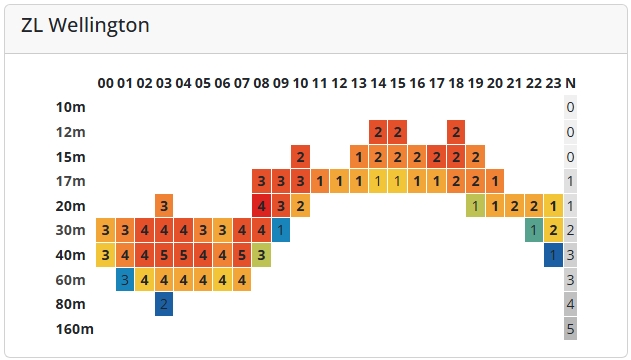
The numbers in each square represent predicted S units, while the color shading indicates probability, with deeper reds signaling the most favorable conditions.
KC2G’s tool isn’t the only option. Many operators also rely on:
- VOACAP Online (voacap.com)
- DXHeat Propagation
- HamQTH Propagation Forecasts
- DX Atlas (desktop software)
Each has its strengths, and your preferred mix may differ, but the core message remains the same: go in prepared. When you power up your rig, have a clear target in mind and a solid understanding of when and where that station is most likely to hear you.
Have a Plan
It’s worth repeating that having a plan before you dive into a DX session pays enormous dividends. That doesn’t mean you can’t occasionally fire up the rig just to see what’s out there. I do that myself from time to time—what I jokingly call Vegas DXing. You spin the waterfall, take your chances, and sometimes you walk away with a surprise catch. There’s no real downside, and it can be a lot of fun.
But if your goal is to make steady progress toward awards or to land specific DXCC entities, a more deliberate approach makes a dramatic difference. When you operate with a clear target in mind—knowing which bands are likely to be open, when the path is strongest, and which stations are active—you’ll see your success rate multiply. In my experience, a focused, data driven strategy delivers results that are easily an order of magnitude better than simply rolling the dice.
Spontaneous operating has its charm, but purposeful DX ing is where the real payoff lies.
DXpeditions
DXpeditions are one of the most reliable ways to snag a rare or long sought DX entity.

Upcoming operations are usually announced on sites like dx-world.net, where you can see who’s going where, when they’ll be active, and which modes they plan to use. These days, nearly every expedition includes FT8 in its lineup, often with several simultaneous stations spread across multiple bands.
This has opened the door to working locations that would otherwise be nearly impossible—tiny islands, remote reefs, and other lonely specks in the ocean. I’ve managed to log quite a few of those “middle of nowhere” spots thanks to FT8 enabled DXpeditions.
To AGC or not to AGC, that is the question...
When running FT8, AGC is usually more trouble than help, and that goes against decades of habit for a lot of operators. FT8 doesn’t need “pleasant” audio — it needs rock-steady signal levels fed into the decoder for the full 12–15-second sequence. With AGC ON, especially fast AGC, a single strong local station can drag the receiver gain up and down across the passband. That flattens weaker FT8 tones and costs you decodes. Fast AGC is the worst offender; it reacts instantly and never settles, turning the waterfall into a moving target.

With AGC OFF, you must take control of RF gain, and that’s exactly what you should do. Back the RF gain down until the band noise just lifts the baseline of the waterfall — not bright white, not jet black. You’re aiming for a quiet, even noise floor with strong signals visible but not dominating. If you hear clipping, distortion, or see the waterfall smear when a strong signal appears, reduce RF gain further. Done right, strong stations won’t crush the weak ones, and WSJT-X gets a consistent input level to work with. This is the same manual-gain discipline old-timers used for weak-signal CW, and it works just as well here.
If your radio misbehaves with AGC fully disabled — some do — slow AGC is the acceptable fallback, still with RF gain backed off somewhat so AGC action is minimal. Avoid fast AGC entirely. Bottom line: AGC OFF with RF gain set manually is best; SLOW only if necessary; FAST never. FT8 rewards steady levels and operator discipline, not automation.
Ethics, Courtesy, and Discipline
FT8 removes much of the human interaction from a contact, but it doesn’t remove responsibility. Good operating practices still matter, arguably more than ever. Blindly calling without listening, tailgating transmit slots, calling stations you can’t possibly reach, or endlessly hammering a DX station that clearly isn’t hearing you only degrades the band for everyone else. The automation built into FT8 is a tool, not an excuse to stop thinking. If anything, the lack of voice forces the operator to be more observant and more disciplined.
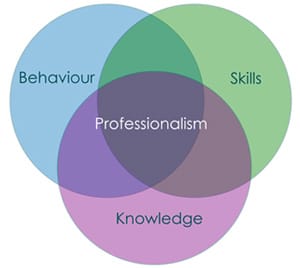
Perhaps the most important courtesy on FT8 is knowing when to stop. If a station isn’t responding after several well-timed calls, it’s time to move on. When the pileup is large, patience and timing beat persistence every time. Keep your signal clean, your power appropriate, and your operating window clear. FT8 works astonishingly well when operators respect each other and the spectrum they share. Run it with the same restraint and professionalism that have always defined good CW and DX operating, and the mode will reward you accordingly.
Audio Chain Discipline
In FT8, the audio chain is not a place for creativity. Unlike SSB, where EQ, compression, and “punch” can be useful, digital modes demand absolute neutrality. Every stage—from WSJT-X through the computer’s sound system, into the radio, and finally through the transmitter—must be treated as a linear measurement path, not an audio enhancement chain. Any nonlinearity introduces distortion and raises your IMD products, widening your signal and increasing the noise floor for everyone else. The fact that FT8 still decodes a distorted signal does not mean it’s acceptable—it just means the algorithm is forgiving.
The rules are simple and old-fashioned for a reason: no audio compression, no EQ, no “enhancements,” and no ALC action. Set your digital output level so transmit power is achieved without triggering ALC, then leave it alone. On receive, keep audio levels consistent so the decoder sees a stable signal window from cycle to cycle. If you change bands, antennas, or power levels, recheck your drive—don’t assume yesterday’s settings still apply. Operators who get this right are almost never the ones causing splatter, and they’re almost always the ones getting through. FT8 rewards restraint, cleanliness, and repeatability—the same virtues that have always separated good operators from loud ones.
This article is reprinted with permission of the author, Christopher Krstanovic - AI2F.
About Author
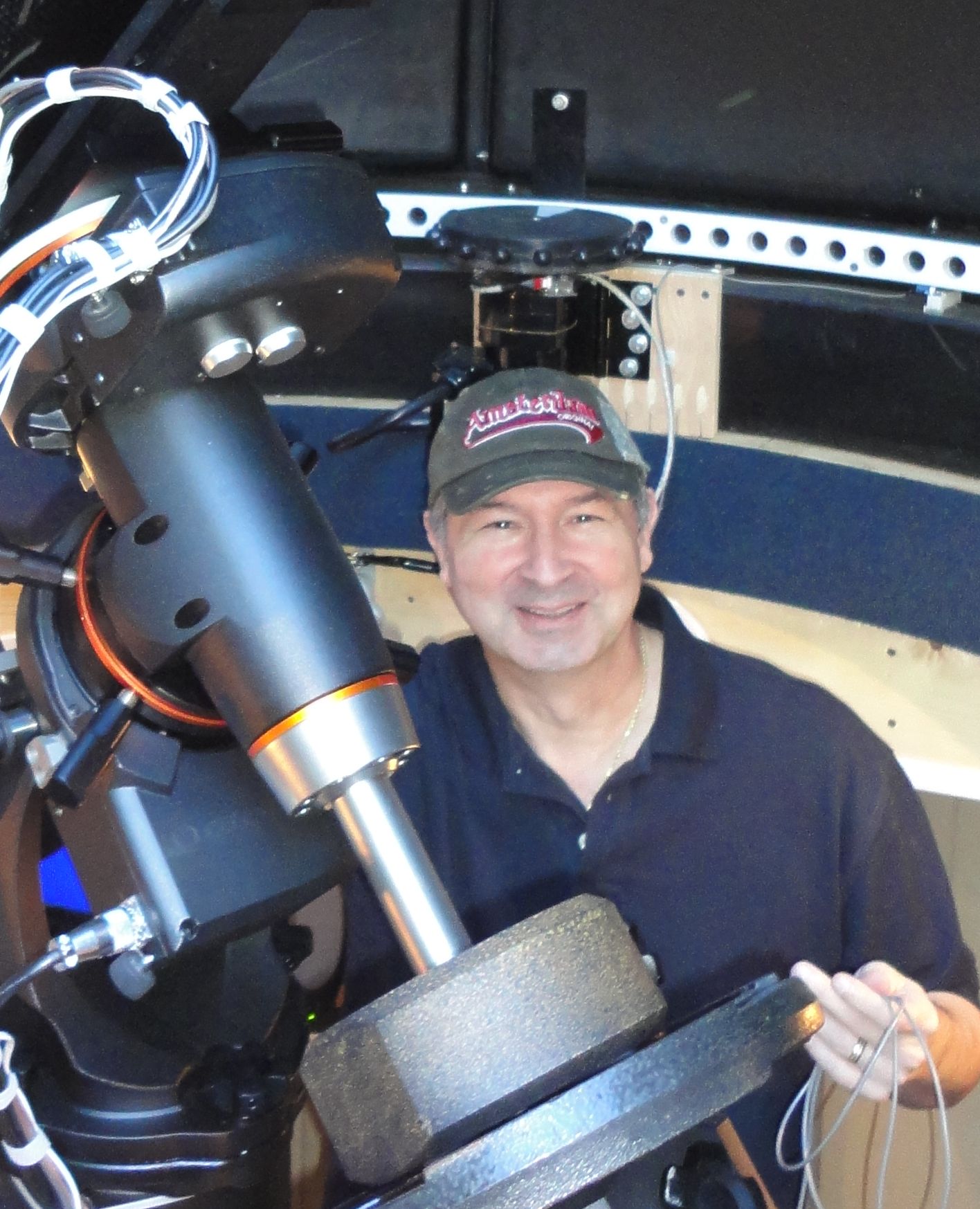 Christopher Krstanovic, AI2F, is a lifelong amateur radio operator, first licensed in the US in 1980s as WR1F. He holds degrees in Physics and a PhD in Electrical Engineering, and his career has spanned corporate engineering as well as technology entrepreneurship. After leaving corporate America, he founded and led three companies before returning to active amateur radio under his current call sign. His operating interests include HF, antenna design, practical radio engineering, Astronomy.